
In short
Hornetsecurity, now Hornetsecurity by Proofpoint, is a cloud email security vendor best known for 365 Total Protection, a Microsoft 365 suite in four cumulative plans: filtering and encryption, then archiving and continuity, then backup, then awareness training and DMARC. It runs in MX, API or Hybrid mode and can be billed monthly, terms confirmed at quote.
Get a quote for Hornetsecurity 365 Total Protection
Tell us roughly how many users or sites you have and we will come back to you with options and a quote.
Hornetsecurity, now part of Proofpoint
Proofpoint completed its acquisition of Hornetsecurity (opens in a new tab) on 8 December 2025. Hornetsecurity now runs as a dedicated business unit within Proofpoint serving MSPs and smaller organisations, under the Hornetsecurity by Proofpoint name, and Hornetsecurity says that unit is responsible for both the Hornetsecurity and Proofpoint Essentials product lines. Its flagship suite appears as Hornetsecurity 365 Total Protection on hornetsecurity.com and as Proofpoint 365 Total Protection on proofpoint.com. They are the same product.
Vade, the AI anti-phishing specialist, is also part of Hornetsecurity; its Microsoft 365 product has its own page, Vade for M365.
In the product


365 Total Protection plans 1 to 4
The plans are cumulative: each one includes everything in the plan below it.
| Plan | What it adds |
|---|---|
| Plan 1 Business | Spam and malware filtering, automated email encryption, and email signatures and disclaimers |
| Plan 2 Enterprise | Advanced Threat Protection, email archiving and the email continuity service |
| Plan 3 Enterprise Backup | 365 Total Backup: automatic backup of Microsoft 365 data, granular recovery with end-user self-service, and unlimited storage |
| Plan 4 Compliance & Awareness | Security Awareness Service, Permission Management, DMARC reporting and management, AI Recipient Validation, Teams Protection and AI Email Security Analyst |
Most organisations choose between Plan 2, for email security with archiving and continuity, and Plan 3 or 4 when they also want Microsoft 365 backup and the governance tools in one subscription. We help you pick the plan that fits.
Not sure which plan fits? Ask us
Tell us what you need and we will recommend the right plan for your organisation, with a quote.
MX, API or Hybrid mode
Hornetsecurity lets you choose how 365 Total Protection connects, and its email security modes page sets out what each mode includes:
| Feature | MX mode (gateway) | API mode | Hybrid mode |
|---|---|---|---|
| Spam and malware protection | Yes | Yes | Yes |
| Advanced Threat Protection | Yes | Yes | Yes |
| Post-delivery protection | Not listed | Yes | Yes |
| Email encryption | Yes | Not listed | Yes |
| Signatures and disclaimers | Yes | Not listed | Yes |
| Email archiving | Yes | Not listed | Yes |
| Email continuity | Yes | Not listed | Yes |
MX mode is a secure email gateway that needs an MX record change. API mode is integrated cloud email security with no MX change, which Hornetsecurity notes is post-delivery protection only. Hybrid mode checks mail before and after delivery, and Hornetsecurity says plans can now be onboarded in Hybrid mode. Our ICES vs SEG guide explains the trade-offs.
Filtering and Advanced Threat Protection
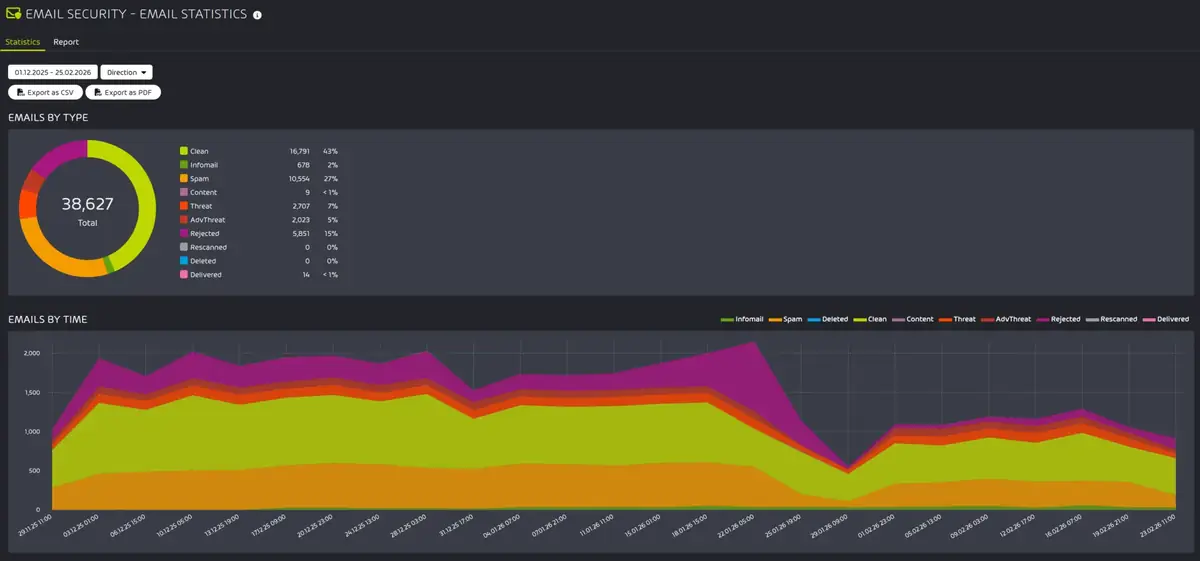
Plan 1's filter covers spam, malware and phishing, with content control for attachments (including nested archives), a compliance filter for custom mail rules, outbound filtering, live email tracking, quarantine reports with one-click release and an infomail filter that separates newsletters from the inbox. Hornetsecurity says the service holds incoming mail for up to seven days if your mail server is unavailable.
Advanced Threat Protection, from Plan 2, adds:
- Sandbox Engine: attachments are run in an isolated environment to look for malware
- Secure Links: URLs are rewritten so clicks pass through Hornetsecurity's secure web gateway (opens in a new tab)
- QR Code Analyzer: detects QR codes in the body of an email or inside images, to catch quishing
- Malicious Document Decryption: encrypted attachments are decrypted and scanned
- Targeted fraud forensics: checks for identity spoofing, intention recognition and fraud attempts, aimed at business email compromise
- Real-time alerts and reporting for your IT team
Is Hornetsecurity 365 Total Protection the right fit for you?
We will check it against your systems and requirements and recommend the right option.
Email encryption
365 Total Protection includes Hornetsecurity's Email Encryption from Plan 1. It signs and encrypts outgoing mail automatically with S/MIME and PGP, uses TLS, manages certificates and keys, and lets you set encryption policies at domain, group and user level. Hornetsecurity also lists confidential communication via Websafe. Hornetsecurity notes that certificate subscriptions may cost extra, which we confirm at quote.
Encryption needs MX or Hybrid mode. For the methods compared, see email encryption for business; for policy-based protection of outbound data, see email DLP.
Archiving, backup, DMARC and training
The higher plans bring tasks that usually need separate products into the same subscription. Each has a specialist guide on our sister sites:
- Email archiving (Plan 2 and up): incoming and outgoing mail is archived automatically and unalterably, with retention periods, audited access and export. See email archiving software (opens in a new tab)
- 365 Total Backup (Plan 3 and up): automatic backup of mailboxes, Teams chats, OneDrive, SharePoint and Entra ID several times a day, stored independently of Microsoft. See Microsoft 365 backup providers (opens in a new tab)
- DMARC Manager (Plan 4): DMARC, DKIM and SPF set-up and reporting across your domains, plus BIMI and SMTP TLS reports. See DMARC management (opens in a new tab)
- Security Awareness Service (Plan 4): automated phishing simulations and e-training matched to each user. See the Hornetsecurity Security Awareness Service (opens in a new tab)
Plan 4 also adds three AI tools: AI Recipient Validation warns users in Outlook before they send to the wrong person or share sensitive data, Teams Protection warns about malicious links in Teams chats and can delete those conversations, and AI Email Security Analyst gives users an automatic analysis of the emails they report.
365 Total Protection or Proofpoint Essentials?
Both now sit in the same Proofpoint business unit, so buyers often compare them:
| Hornetsecurity 365 Total Protection | Proofpoint Essentials | |
|---|---|---|
| Built for | Microsoft 365 | Microsoft 365 and Exchange, as a gateway |
| How it connects | MX, API or Hybrid | Cloud gateway (MX), with Microsoft 365 API integration |
| Packaging | Plans 1 to 4 | Business, Advanced and Professional, each with a plus version |
| Microsoft 365 backup | Plan 3 and up | Not listed |
| Archive | Plan 2 and up | Professional packages |
| Awareness training | Plan 4 | Sold separately |
Choose 365 Total Protection if you want backup, training and governance in one Microsoft 365 subscription, or the option of API or Hybrid mode. See Proofpoint Essentials for the gateway packages, and our sister site's Hornetsecurity vs Proofpoint Essentials (opens in a new tab) comparison for the training side.
UK licensing and buying at a glance
| Buying fact | Hornetsecurity 365 Total Protection |
|---|---|
| What you buy | One of four cumulative plans: Plan 1 Business, Plan 2 Enterprise, Plan 3 Enterprise Backup or Plan 4 Compliance & Awareness |
| Licensing basis | By plan and number of users, confirmed at quote |
| Mail platform | Microsoft 365 |
| Connection mode | MX, API or Hybrid; encryption, signatures, archiving and continuity need MX or Hybrid mode |
| Possible extra | Hornetsecurity notes that certificate subscriptions for encryption may cost extra |
| Billing | Can be billed monthly, terms confirmed at quote |
| How to buy | Ask us for a quote |
Plan and renewal detail is on our sister site's Hornetsecurity licensing (opens in a new tab) page.
The licensing basis and billing rows are our own terms. The other rows follow the sources below.
Sources (checked 11 November 2026): Hornetsecurity 365 Total Protection; Hornetsecurity email security modes; Proofpoint 365 Total Protection; Proofpoint press release on the Hornetsecurity acquisition.
Licensing and how we help
Licensing depends on the plan and number of users. It can be billed monthly, terms confirmed at quote, so ask us for a quote. How quotes are built across vendors is explained under how email security is priced.
We can help you choose the plan and the connection mode, set up domains and user sync, make the MX and connector changes for MX or Hybrid mode, build filtering and encryption policies, and switch on archiving, backup or DMARC reporting if your plan includes them. Contact us to discuss 365 Total Protection.
What affects Hornetsecurity 365 Total Protection pricing
365 Total Protection is licensed per user, and the plan sets the rest: Plan 1 Business covers filtering and encryption, Plan 2 Enterprise adds Advanced Threat Protection, archiving and continuity, Plan 3 adds Microsoft 365 backup and Plan 4 adds the awareness and governance tools. Choosing the lowest plan that covers what you need keeps the quote down, and we can price two plans side by side.
- Plan: Plan 1 to Plan 4
- Backup: Included from Plan 3
Get a quote for Hornetsecurity 365 Total Protection
Tell us what you need and we will come back to you with a quote.
How Forever Systems helps with email security
We are an independent UK IT and cyber security provider. We supply several email security platforms, so we can suggest what suits your mail system, your risks and your budget.
- Start with what you have: we can review the protection already built into Microsoft 365 or Google Workspace before suggesting anything extra
- Compare like for like: API-based protection, secure email gateways and email filtering, encryption services and DLP from the vendors we supply, explained in plain English
- Get authentication right: we help you plan SPF, DKIM, DMARC and MTA-STS so genuine mail is delivered and spoofed mail is not
- Deployment help: connecting a platform to Microsoft 365 or Google Workspace, mail routing changes and policy set-up, scoped at quote
- Email signatures: one approved signature and disclaimer on every email with Exclaimer email signature management
- People and backup too: security awareness training, Check Point Email Security and Sophos from our specialist sites
Tell us about your mail system and we will suggest options, with pricing confirmed at quote.
Frequently asked questions
What is Hornetsecurity?
Hornetsecurity is a cloud email security vendor, now a business unit of Proofpoint trading as Hornetsecurity by Proofpoint. Its main product is 365 Total Protection, a suite for Microsoft 365 that combines email filtering, encryption, advanced threat protection, archiving, backup, awareness training and DMARC management in four plans.
Is Hornetsecurity part of Proofpoint?
Yes. Proofpoint completed its acquisition of Hornetsecurity on 8 December 2025. Hornetsecurity runs as a business unit within Proofpoint, and 365 Total Protection is also sold as Proofpoint 365 Total Protection.
Does 365 Total Protection need an MX record change?
Only in MX or Hybrid mode. API mode connects to Microsoft 365 with no MX change but is post-delivery protection only, and encryption, signatures, archiving and continuity need MX or Hybrid mode.
Which 365 Total Protection plan includes backup?
Plan 3 Enterprise Backup adds 365 Total Backup, and Plan 4 Compliance & Awareness includes it too. Plans 1 and 2 cover email security, with archiving and continuity from Plan 2.
Does Hornetsecurity 365 Total Protection protect Google Workspace?
Google Workspace is not listed. 365 Total Protection is built for Microsoft 365. For Gmail, see the platforms that protect Google Workspace in our email security comparison.
Which plan includes DMARC Manager and Teams Protection?
Plan 4 Compliance & Awareness. It adds DMARC reporting and management, Security Awareness Service, Permission Management, AI Recipient Validation, Teams Protection and AI Email Security Analyst.
How is 365 Total Protection licensed?
Licensing depends on the plan and number of users. It can be billed monthly, with terms confirmed at quote. Ask us for a quote.
Still have a question about Hornetsecurity 365 Total Protection?
Ask us and a member of our team will get back to you.
More email security guides
 Proofpoint EssentialsProofpoint's cloud email gateway for smaller organisations: packages, Microsoft 365 routing, encryption, continuity and archiving.Vade for M365AI anti-phishing for Microsoft 365 and Google Workspace by API, with auto-remediation. Vade is now part of Proofpoint.BarracudaBarracuda's email suite: an Email Gateway Defense gateway or API-only Integrated Email Protection, with backup, archiving and training in the higher plans.ICES vs SEGAPI email security or a secure email gateway: a side-by-side decision guide.Microsoft 365Anti-phishing policies, preset policies, Safe Links, user reporting and when to add a third-party layer.